Containers – {THM-Advent of Cyber 2025}
Learn about container security.
What Are Containers?
To understand what a container is, we first need to understand the problem it fixes. Put plainly, modern applications can be quite complex:
- Installation: Depending on the environment the application is being installed in, it’s not uncommon to run into “configuration quirks” which make the process time-consuming and frustrating.
- Troubleshooting: When an application stops working, a lot of time can be wasted determining if it is a problem with the application itself or a problem with the environment it is running in.
- Conflicts: Sometimes multiple versions of an application need to be run, or perhaps multiple applications which need (for example) different versions of Python to be installed. This can sometimes lead to conflicts, further complicating the process.
Containerisation solves these problems by packing applications, along with their dependencies, in one isolated environment. This package is known as a container. In addition to solving all the above problems, containers are lightweight and offer other benefits.
Containers vs VMs
A virtual machine runs on a hypervisor (software that emulates and manages multiple operating systems on one physical host). It includes a full guest OS, making it heavier but fully isolated. Containers share the host OS kernel, isolating only applications and their dependencies, which makes them lightweight and fast to start.
Virtual machines are ideal for running multiple different operating systems or legacy applications, while containers excel at deploying scalable, portable micro-services.
Docker
Docker is an open-source platform for developers to build, deploy, and manage containers. Containers are executable units of software that package and manage the software and components to run a service. They are pretty lightweight because they isolate the application and use the host OS kernel.
Escape Attack & Sockets
A container escape is a technique that enables code running inside a container to obtain rights or execute on the host kernel (or other containers) beyond its isolated environment (escaping). For example, creating a privileged container with access to the public internet from a test container with no internet access.
Answer the questions below
- What exact command lists running Docker containers?
docker ps - What file is used to define the instructions for building a Docker image?
“Dockerfiles, simple text scripts defining app environments and dependencies, to build, package, and run applications consistently across different systems.”
Dockerfile - What’s the flag?
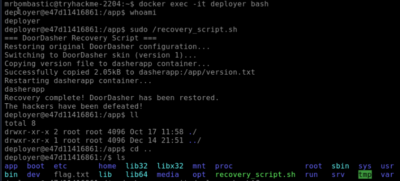
docker exec -it deployer bash
sudo /recovery_script.sh
cd ..
ls
cat flag.txt
THM{DOCKER_ESCAPE_SUCCESS}
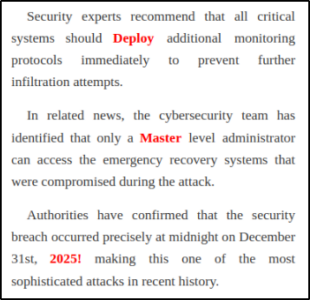
 4. Bonus Question: A secret code is embedded within the news site running on port 5002; this code also happens to be the password for the deployer user. They should definitely change their password. Can you find it?
Go to http://<your_target_IP>:5002 – and look for the text highlighted in Red (separated into 3 sentences)
DeployMaster2025!
Thank you for reading my article. Stay tuned for more articles on cybersecurity, bug bounty hunting, CTFs, and more.