How cookies work in Web Applications
Everyone loves cookies, right? Well, I am talking about different types of cookies, and I hope you gain some knowledge from my post.
Let’s dive into it.
Cookies play a critical role in web application pentesting due to their ability to manage user sessions, preferences, and security attributes. They are often a primary target for multiple attack vectors because they help maintain stateful interactions in inherently stateless HTTP communications.
Cookie Functions in Web Apps
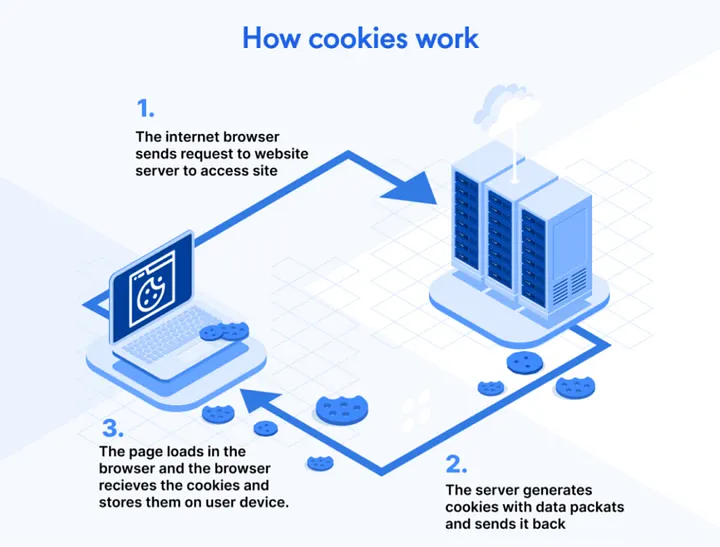
Cookies store essential data, such as session tokens, authentication details, user preferences, and tracking identifiers, allowing users to remain authenticated, save settings, and navigate between pages seamlessly. When a user logs into a site, the server typically issues a cookie with a session ID to uniquely identify and maintain the user’s session.
Common Cookie Security Attributes
Several cookie attributes are critical for securing web applications:
• HttpOnly: Prevents JavaScript from accessing the cookie, offering protection against cross-site scripting (XSS).
• Secure: Ensures cookies are only sent over encrypted HTTPS connections.
• SameSite: Restricts cross-origin cookie transmission, mitigating cross-site request forgery (CSRF).
• Domain/Path: Controls where a cookie is valid on the site, reducing accidental leakage.
Typical Pentesting Techniques Involving Cookies
• Session Hijacking: Attackers steal session cookies through XSS or network interception, allowing them to impersonate users.
• Cookie Tampering/Poisoning: Modifying cookie values (e.g., manipulating roles or privileges) and observing if the application detects and handles unauthorized changes.
• Cookie Attribute Testing: Pentesters check whether security flags (HttpOnly, Secure, SameSite) are properly set, using tools like Burp Suite or browser developer tools (document.cookie via console). They automate these checks across browsers and sessions with frameworks like Selenium.
• Persistence and Expiry Testing: Verifying cookie expiry behaviours and how the app reacts to stale or deleted cookies.
Best Practices and Tools
• Use interception proxies (Burp Suite, OWASP ZAP) to monitor and tamper with cookies and session data.
• Automate repetitive cookie behaviours and security flag verification using tools like Selenium or Cypress.
• Always review cookies for excessive data, privacy issues, and compliance with regulations such as GDPR.
Web app pentesting involves systematically testing cookies for vulnerabilities, correct security configurations, and resilience against manipulation and abuse, as cookies are central to session management and authentication in most web applications.
Thank you for reading my blog post.