Phishing Simulation Campaign
Running a Phishing Simulation with GoPhish and Morning Catch
Phishing is still the number one initial access vector in most breach reports, and the best way to understand why it works is to run one yourself — in a safe, authorized lab. In this post I walk through standing up a full phishing simulation campaign using GoPhish, targeting the fictional Morning Catch Corporation, with a cloned Mutillidae page from Metasploitable2 acting as the credential-harvesting landing page.
This exercise was run entirely inside an isolated training environment against a fictional company and a disposable test mailbox I created for the purpose. No real people or production systems were involved. GoPhish and phishing techniques in general should only ever be used with explicit authorization.
Why GoPhish?
GoPhish is an open-source phishing framework built around two ideas: affordability (free and open-source) and accessibility (written in Go, ships as a single dependency-free binary). That makes it a go-to tool for security teams running internal phishing awareness programs, and for pentesters simulating social engineering as part of an engagement.
Setting the Stage
On Kali Linux, GoPhish comes with a one-line launcher:
bash

gophish-start
This spins up the web UI at https://127.0.0.1:3333. From there, a campaign comes together in six stages: sending profile → target group → email template → landing page → campaign → results.
1. Building a Believable Sending Profile
Realism starts with the “from” address. I created a throwaway Gmail account for this, enabled two-factor authentication, and generated a Google App Password scoped specifically to GoPhish — rather than handing GoPhish the account’s real password. That app password went into GoPhish’s SMTP sending profile (smtp.gmail.com:587), and a test send confirmed delivery before moving on.
2. Loading the Targets
GoPhish groups let you bulk-import targets via CSV:
csv

First Name,Last Name,Position,Email

Richard,Bourne,CEO,[email protected]

Boyd,Jenius,Systems Administrator,[email protected]

Haiti,Moreo,Sales & Marketing,[email protected]
GoPhish exposes these fields back into your templates via variables like {{.FirstName}} and {{.Position}}, which is what makes pretexts feel personal instead of obviously mass-sent.
3. The Pretext: A “Password Reset”
I kept the email deliberately low-effort — no urgency, no scare tactics, just a routine-sounding notice:
Subject: Password Reset for {{.Email}}
{{.FirstName}}, The password for {{.Email}} has expired. Please reset your password here. Thanks, Morning Catch IT Team
That’s it. No red flags, no spelling errors, nothing to trigger a trained eye — which is exactly the point. Low-effort pretexts are often more effective than dramatic ones, because they don’t trip the mental alarm bells urgency usually sets off.
4. Cloning a Landing Page
Rather than recreating Morning Catch’s own webmail portal, I grabbed the login page from Mutillidae (bundled with Metasploitable2) by viewing page source and importing the raw HTML into GoPhish’s landing page editor. Two settings matter most here:
- Capture Submitted Data and Capture Passwords — turns the clone into an actual credential harvester
- Redirect to the real login page after submission — so the target lands somewhere that looks legitimate and doesn’t immediately realize what just happened
Worth noting: by default, GoPhish stores captured credentials in cleartext in its database. That’s a detail worth flagging in any real engagement report.
5. Launching and Watching It Land
With the sending profile, template, landing page, and group all wired together, launching the campaign is a single click. The email arrived in the target inbox looking exactly as crafted — a plain, boring IT notice.
Clicking the embedded link routed through GoPhish’s tracking handler, logged the click, then delivered the cloned Mutillidae login page. Entering credentials there submitted them straight back to GoPhish.
Results
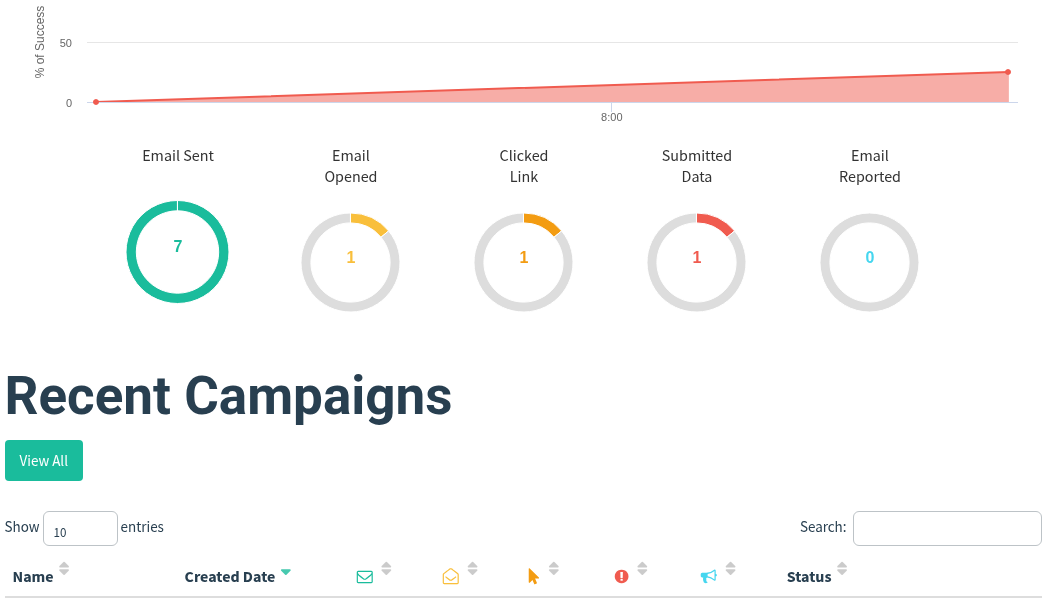
| Metric | Count |
|---|---|
| Emails Sent | 7 |
| Opened | 1 |
| Clicked Link | 1 |
| Submitted Data | 1 |
| Reported as Suspicious | 0 |
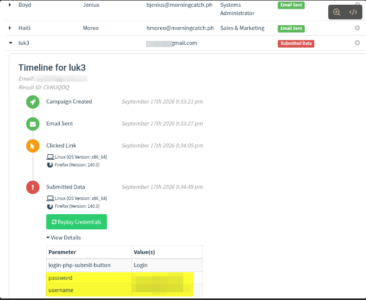
The per-target timeline shows the full chain — email sent, link clicked less than a minute later, and credentials submitted roughly 40 seconds after that:
Campaign Created  → 9:33:21 PM

Email Sent        → 9:33:27 PM

Clicked Link      → 9:34:05 PM

Submitted Data     → 9:34:49 PM
Lessons from This Lab
- Minimal pretexts convert. Nothing about this email was sophisticated, and it still produced a click and a credential submission in under 90 seconds.
- The redirect matters. Sending the target to a real-looking post-login page after capture meaningfully reduces the chance they realize anything happened.
- A 0% report rate is itself the headline finding. In a real engagement, that number — not the click rate — is usually what drives the business case for awareness training.
- App passwords are a small but important hygiene step, even in a lab: never feed a tool your actual account credentials when a scoped alternative exists.
If you’re building out a security awareness program, GoPhish is a genuinely low-friction way to get real, measurable data instead of guessing at how your organization would respond to this kind of email.
Full writeup and reference material: GoPhish User Guide