SOC Home Lab
Building a SOC Home Lab Using Wazuh, VMware & Sysmon🖥️
When I started learning cybersecurity, I wanted practical experience instead of only watching tutorials. So I decided to build my own Home SOC (Security Operations Center) Lab. After multiple crashes, installation issues, and troubleshooting, I finally built a working SOC environment using:
- Kali Linux
- Ubuntu Server
- Windows 11
- VMware
- Wazuh SIEM
- Sysmon
In this article, I’ll explain how I built it step-by-step.
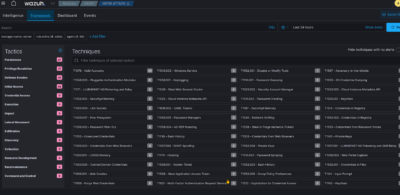
Hardware Used
Main Computer
Specs:
- 32GB RAM
- RTX 3070
- 12-Core Processor AMD Ryzen 9 5900X
- 4TB SSD
Used for:
- VMware
- Ubuntu Server VM
- Windows 11 VM
- Kali Linux attacker machine VM
SOC Lab Architecture
Kali Linux
↓
Windows 11 VM
↓
Sysmon Logs
↓
Wazuh Agent
↓
Wazuh Dashboard
⚙️ Step 1 — Installing VMware
VMware seems to be more stable for this type of setup. You may choose other virtualization platform such as VirtualBox, but you may end up with several issues.
For example: lag, mouse freezing, graphics issues or the Wazuh dashboard it simply crashes.
🐧 Step 2 — Creating Ubuntu Server headless VM
Create an Ubuntu Server virtual machine with:
- 4GB RAM
- 2 CPU Cores
- 40GB Storage
- NAT Networking
Ubuntu Server headless instead of Ubuntu Desktop is the preferred choice because it is:
✅ lightweight
✅ faster
✅ uses less RAM
✅ better for SIEM tools
During installation SSH must be enabled:
- OpenSSH Server
🛡️ Step 3 — Installing Wazuh SIEM
After Ubuntu installation:
Update the system
sudo apt update && sudo apt upgrade -y
Install curl
sudo apt install curl -y
Download Wazuh installer
curl -sO https://packages.wazuh.com/4.7/wazuh-install.sh
Install Wazuh
sudo bash ./wazuh-install.sh -a
🌐 Step 4 — Accessing the Dashboard
Once installation is complete, check the Ubuntu Server IP:
ip a
Then opened the dashboard in your browser:
https://YOUR-IP
The browser showed a “Not Secure” warning because Wazuh uses a self-signed SSL certificate by default. After proceeding, I finally reached the Wazuh dashboard 🔥
🪟 Step 5 — Creating Windows 11 VM
Next, create a Windows 11 virtual machine.
VM Configuration
- 4GB RAM
- 2 CPU cores
- 40GB Storage
This machine acts as the victim endpoint inside the SOC lab.
🔗 Step 6 — Connecting Windows to Wazuh
Inside the Wazuh dashboard:
- Deploy a new Windows Agent
- Enter the Wazuh Server IP
- This will generate the installation command for Powershell
Then in Windows PowerShell (Admin), copy paste the command provided to install the Wazuh Agent.
It will look something like this:
PS C:\WINDOWS\system32> Invoke-WebRequest -Uri https://packages.wazuh.com/4.x/windows/wazuh-agent-4.14.6-1.msi -OutFile $env:tmp\wazuh-agent; msiexec.exe /i $env:tmp\wazuh-agent /q WAZUH_MANAGER=’192.xxx.xxx.xxx’ WAZUH_AGENT_GROUP=’default’ WAZUH_AGENT_NAME=’AgentBob’
Then start the Wazuh security agent service with the following command:
PS C:\WINDOWS\system32> NET START Wazuh
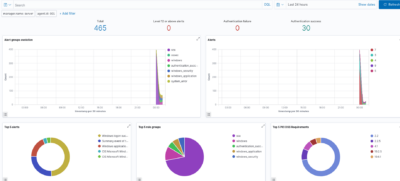
After installation, the Windows endpoint appeared as:
✅ Active
inside the Wazuh dashboard.
📊 Step 7 — Installing Sysmon
To generate detailed Windows security logs, I installed Sysmon.
Sysmon helps monitor:
- process execution
- PowerShell activity
- network connections
- suspicious activity
- persistence techniques
I installed Sysmon using:
.\Sysmon64.exe -i .\sysmonconfig-export.xml -accepteula
😈 Step 8 — Generating Security Events
Using my Kali Linux machine, I generated activity like:
- Nmap scans
- PowerShell commands
- failed logins
- network enumeration
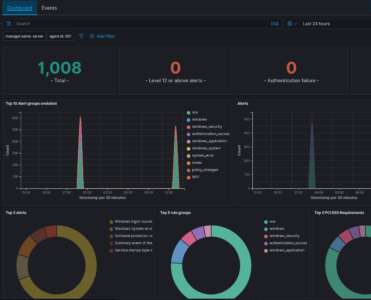
Inside the Wazuh dashboard, I could see:
- security alerts
- event logs
- endpoint activity
- monitoring data
This was my first real hands-on SIEM experience.
📚 Learned Outcome
This project helped me understand:
✅ SIEM basics
✅ SOC workflows
✅ Threat monitoring
✅ Log analysis
✅ Windows event logging
✅ Linux server management
✅ Endpoint monitoring
✅ VMware networking
It also improves your troubleshooting skills because you will most likely face multiple issues such as:
- installation errors
- VM crashes
- authentication problems
- networking issues
🚀 Final Thoughts
Building a Home SOC Lab is one of the best ways to learn cybersecurity practically.
You learn much more by doing hands-on rather than watching YT tutorials:
- configuring tools
- troubleshooting errors
- monitoring logs
- analyzing alerts
#Support the Channel..!
Buymeacoffee
buymeacoffee.com/0xluk3
Paypal
paypal.me/luk335/10usd
Stripe
https://buy.stripe.com/14AbJ2bJz9YtdogdFJ1ck00